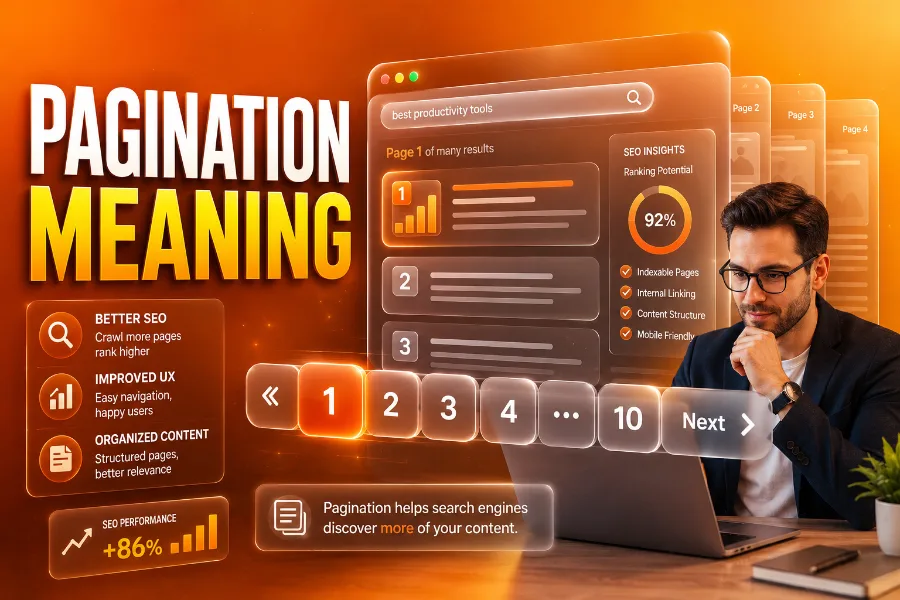
Pagination refers to the process of breaking up large amounts of content into separate, manageable pages, instead of overwhelming the user with a long, never-ending scroll. Pagination is a fundamental design and SEO practice that allows websites to deliver content efficiently, improving both user experience and performance.
In the digital world, pagination plays a key role in organizing large datasets, such as product listings, search results, or long-form content. This process not only ensures better organization but also optimizes website navigation, keeping visitors engaged and helping search engines understand the website’s structure. In this article, we will delve into the importance of pagination, how it works, and best practices for implementing it effectively on your website.
The Importance of Pagination for User Experience
Pagination significantly improves the user experience on websites, especially for those that feature large amounts of content, such as eCommerce stores, blogs, and news sites. Without pagination, visitors would be forced to load endless pages of content at once, which can be overwhelming and slow. By breaking content into smaller, more digestible chunks, users can find what they’re looking for faster and with less effort.
In addition, pagination enhances a website’s accessibility by organizing its content into distinct sections, making it easier for users to navigate. For example, an eCommerce website might use pagination to list products by category, allowing customers to browse a set number of products per page. This system not only prevents information overload but also increases the likelihood that users will find the product they want without getting distracted or frustrated.
For instance, it’s essential to ensure that your website pages are properly indexed by Google for better visibility. You can instantly verify your indexed web pages to ensure that your paginated content is being properly recognized by search engines.
Pagination and SEO: Why It’s Crucial for Your Website
One of the primary reasons pagination is so vital to modern websites is its direct impact on SEO. Search engines like Google need to crawl and index every page of a website in order to rank it in search results. Pagination allows search engines to navigate a site and index content more effectively, preventing problems such as duplicate content that can arise when all content is displayed on a single long page.
If your website has multiple pages that share similar content, it’s important to use pagination with proper tags like canonical tags and “rel=next/prev” links to signal to search engines that these pages are part of a larger, connected group. This ensures that each page is treated individually while avoiding duplicate content penalties. Additionally, pagination makes it easier for search engines to crawl and discover new pages, improving the overall SEO health of your website.
To further improve your site’s SEO, consider using tools like Instantly verify Google-indexed web pages to confirm that all your paginated pages are properly indexed by search engines.
Best Practices for Implementing Pagination
When implementing pagination, it’s important to follow best practices to enhance the user experience and SEO performance. Here are some key guidelines to follow:
- Clear Navigation: Pagination controls should be easy to find and use. For example, if you are using numbered pagination, ensure the page numbers are clearly visible. Additionally, providing buttons for “Previous” and “Next” makes it easy for users to move between pages.
- URL Structure: Each paginated page should have a unique URL to help search engines properly index it. Avoid using URL fragments or session IDs, as they can confuse search engines and negatively impact crawling. Instead, ensure that your URLs reflect the hierarchy and content of the paginated sections.
- Avoid Infinite Scroll for Large Datasets: While infinite scroll may be tempting for some websites, it is not ideal for all content types. Websites with large datasets, such as product lists or articles, can benefit more from a traditional pagination approach. Infinite scroll can slow down website performance and make it difficult for search engines to crawl content beyond the first batch.
You can also improve your site’s indexation and crawling efficiency by ensuring that your paginated pages are recognized by search engines. Learn more about why Google may not index your pages to understand how to troubleshoot potential issues.
The Role of Canonical Tags in Pagination
One of the most important aspects of pagination for SEO is the use of canonical tags. These tags signal to search engines which page in a series is the “main” or “original” page. When you paginate content, you should add a canonical tag to each page in the series to ensure that search engines treat them as a part of the same set rather than as duplicate pages.
For example, if you have a multi-page product listing, the canonical tag on each page should point to the first page of the series. This helps maintain the flow of link equity and ensures that the first page gets the most SEO credit. Additionally, it helps search engines avoid mistakenly penalizing your site for duplicate content.
By using canonical tags correctly, you improve the chances of your site ranking higher for relevant keywords, while ensuring that search engines crawl all the content efficiently.
Pagination Design Patterns: What Works Best?
When deciding how to structure pagination on your site, it’s essential to choose a design pattern that aligns with the type of content you are displaying. Here are a few common pagination designs:
- Traditional Numbered Pagination: Ideal for websites with static content like blogs or product listings, where users are likely to want to jump between pages.
- Next/Previous Pagination: Best suited for blogs or articles where users might want to read through content in sequence.
- Infinite Scroll: Works well for social media platforms or image galleries, where users may want to keep scrolling and browsing content continuously.
Each design pattern offers different benefits, so it’s important to choose one that suits your audience and content type. For example, pagination on an eCommerce store could be done using numbered links or a simple “Next/Previous” button. On the other hand, long-form content may benefit from more sequential or “read-through” pagination systems.
For more detailed insights on optimizing your paginated pages for content-heavy websites, you can visit this resource on how pagination works.
How to Avoid Common Pagination Pitfalls
When implementing pagination, it’s easy to overlook some common mistakes that could hinder both user experience and SEO. Here are a few things to avoid:
- Overcrowding Pagination Controls: Don’t overcrowd your page with too many pagination options, as this can confuse users. Keep the number of links to a minimum, such as showing only a few pages before and after the current page.
- Not Using Noindex Tags on Filtered Pages: If your site uses faceted navigation or filters (such as sorting by price or color), make sure that search engines don’t index duplicate pages created by the filters. Use the “noindex” tag to prevent search engines from indexing these filtered versions.
- Not Monitoring Performance: Be sure to track how well your pagination system is working for both users and search engines. You can check how search engines are indexing your pages using tools like Instantly verify Google indexed web pages.
Conclusion: Pagination Meaning and Its Impact on Your Site
Pagination meaning goes beyond simply breaking up content; it’s about creating an optimized user experience and improving the SEO performance of your website. By ensuring that your paginated content is well-structured and crawlable by search engines, you can improve content discoverability, prevent duplicate content issues, and provide a better browsing experience for your visitors.
Whether you are designing an eCommerce site, a blog, or a news platform, understanding pagination’s meaning and how to implement it effectively can drive better user engagement and improved search rankings. For more guidance on optimizing your website’s pagination structure, be sure to leverage tools like Instantly verify Google indexed web pages.
FAQs
What is pagination and why is it important?
Pagination is the practice of dividing content into multiple pages to improve site navigation and performance. It prevents long loading times, enhances user experience, and helps search engines crawl and index content more efficiently, improving SEO.
How does pagination improve user experience?
Pagination enhances user experience by breaking large sets of data into manageable sections, making it easier for visitors to navigate. It reduces clutter, speeds up page loading, and helps users find relevant content without feeling overwhelmed by excessive information.
How does pagination affect SEO?
Pagination helps SEO by making content more accessible to search engines. It allows for proper indexing of paginated pages, avoids duplicate content issues, and ensures link equity is distributed correctly across pages, enhancing overall site visibility and ranking.
What are the different types of pagination?
The main types of pagination include numbered pagination, “Next/Previous” pagination, and infinite scroll. Numbered pagination is used for content-heavy pages, while “Next/Previous” pagination is ideal for sequential content. Infinite scroll automatically loads more content as users scroll.
How do I implement pagination correctly?
To implement pagination correctly, ensure each page has a unique URL, use clear navigation links, and apply canonical tags to avoid duplicate content. Test the pagination structure to ensure it’s easy to navigate and properly indexed by search engines.
Is infinite scroll a better alternative to pagination?
While infinite scroll can provide a seamless browsing experience, it’s not always the best option for large content sets. Pagination is better for structured content like product listings or blogs, whereas infinite scroll suits continuous browsing experiences.
Can pagination impact page load speed?
Yes, pagination can improve page load speed by limiting the amount of content loaded at once. By loading only a small portion of content per page, websites reduce initial load time, which is crucial for retaining visitors and improving performance.
What is the role of canonical tags in pagination?
Canonical tags indicate the preferred version of a page to search engines. In paginated content, canonical tags help search engines understand the relationship between pages, preventing duplicate content issues and ensuring the correct page is indexed for SEO purposes.
How does pagination affect mobile users?
Pagination provides a more user-friendly experience for mobile users by breaking content into smaller, digestible sections. It avoids long pages that require excessive scrolling, making navigation faster and reducing the chance of users abandoning the site due to performance issues.
Should I use “rel=next” and “rel=prev” for pagination?
While “rel=next” and “rel=prev” were once used for linking paginated pages, Google no longer uses these attributes for indexing. Instead, focus on creating unique URLs for each page and using canonical tags to avoid duplicate content issues.